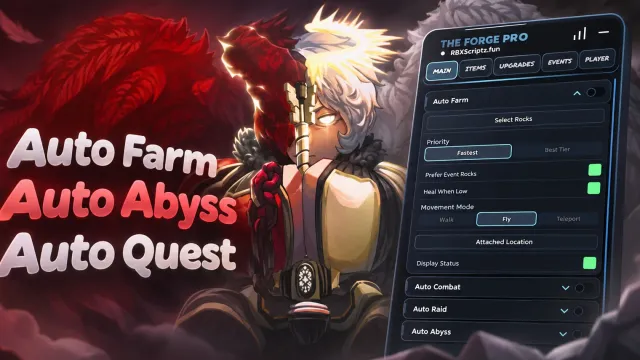
# fire / .gg/firescript### the forge**autofarm**- one toggle to get started, smart mining is selected by default- checks the pickaxe you actually have equipped before picking a rock- goes for stronger rocks when you can break them quickly, instead of avoiding them just because they have more hp- takes travel time into account and adjusts its break-time estimate from observed mining progress- updates target selection when you switch pickaxes- smart, nearest and ore-priority modes- adjustable quick-break target, set to 15 seconds by default- choose specific rocks, possible ores or a mining area- leave the rock and ore filters empty to farm automatically- mine above, underneath or beside rocks- tween or teleport movement- adjustable movement speed, mining distance, swing interval and teleport delay- custom x, y and z offsets, plus pitch, yaw and roll- skip occupied rocks or avoid nearby players- lava options: off, skip the target or move above it- pause at low health and resume once you’ve recovered- pause when storage is full- fight nearby mobs while mining- skip rocks that stop taking damage- manually skip the current target- camera lock with adjustable follow speed- stop after a set time, total ore gains or a chosen ore inventory count- per-ore priorities from 0–5- copy ore-rate reports or send them to your webhook- reset tracking counters, clear filters or restore smart defaults**combat**- farm selected mobs or leave the selection empty for all- nearest-target or preferred-mob priority- fight above, underneath, beside or behind the target- tween and teleport movement- adjustable attack interval, movement speed and combat distance- separate combat offsets and rotation settings- reactive blocking- manual block and stop-block buttons- reactive dodge above attacking mobs, with adjustable height and trigger range- separate lava handling for combat- target camera lock- resume combat button**shops & potions**- pickaxe and potion selection- purchase buttons with adjustable potion amounts- travel to the selected potion shop- open or close the purchase menu- failed shop-session recovery- auto-buy your selected potion below a chosen stock amount- adjustable purchase-check interval- use potions manually or on a timer- separate low-health potion rule- choose the health threshold and minimum time between uses**inventory & selling**- select which ores and materials to sell- manual selling or automatic selling on an interval- vendor selling, plus the game’s sell-anywhere method where permitted- adjustable sell amount and minimum amount to keep- sell only when your bag reaches a chosen fill percentage- add ore rarities to the automatic sell list- protect specific ores or entire ore rarities- set individual ore reserves, like `Iron=20,Stone=10`- reserve materials for your current forge recipe- favorite-item protection and equipped-weapon protection- sell a selected weapon- open the material or weapon sell menus- travel to the material and weapon vendors- equip your strongest owned pickaxe manually or automatically- enhance the selected equipment through the enhancer interface, with a level limit- inventory export**forging & index**- four recipe slots with separate ore amounts- ore choices populated from your inventory- weapon or armor crafting- repeated forging with an adjustable interval- fast-forge setting through the native forge interface- open the forge, travel to it or end the session- automatic ore-index and equipment-index claims- claim-all button for available codex rewards**quests**- quest selection and tracking- travel to the selected quest’s npc- talk to the quest npc- claim ready board quests- open the quest board**player & travel**- walk speed, jump power and gravity controls- always run- noclip- infinite jump- cframe fly with adjustable speed- ctrl + click teleport- teleport or tween to available proximity locations- teleport to a selected player- save, visit and delete named waypoints- copy your saved waypoint names- saved waypoints stay tied to their place- resume autofarm after travelling- anti-afk**visuals**- player, mob and rock esp- selected-player filter- team filtering and visible-only mode- adjustable range, marker limit and refresh rate- separate player, mob and rock colors- name, distance and health displays- health bars and health numbers- boxes, outlines and tracers- text size, line thickness, opacity and vertical-offset controls- player, mob and rock part chams with adjustable transparency- fullbright- custom time of day and ambient color- fog removal and fog-distance control- shadow removal- exposure and fov controls- remove bloom, blur, depth of field, sun rays and atmosphere- remove particles, trails, beams and decals- simplified materials, still water and reflection removal**extras**- manual race reroll- redeem entered codes- local level and money spoofing- static, custom-value and random display modes- fps-boost presets and a restore button- disable 3d rendering- black screen**webhooks, servers & settings**- selected-ore alerts- timed session reports- ore-rate reports and a webhook test button- rejoin, server hop and low-player server hop- hop when a user from your own marked-staff id list joins- rejoin-on-disconnect option- teleport queue support using your hosted script url- save, load and autoload configs- accent-color settings and a changeable menu key- top reopen button and the three bottom utility buttons- one scrolling page per sidebar tab, with no hidden top subtabs- wrapped labels and full-width selectors- full unload||