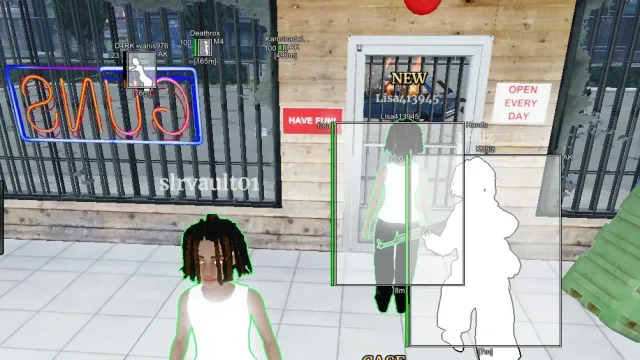
open source Master SettingsEnable ESP Master (Global toggle to turn all ESP on/off)Team Check (Hides ESP for teammates)Max Distance (Slider to limit ESP rendering range)Font Size (Slider to change the size of all ESP text)Box ESPEnable Boxes (Draws a 2D square around players)Box Outline (Adds a black outline around the box)Filled Box (Fills the inside of the box with color)Filled Box Transparency (Slider to adjust how see-through the filled box is)Info & HealthEnable Names (Displays the player's name)Use Display Names (Toggles between Username and Display Name)Enable Distance (Shows how far away the player is in meters)Enable Health Bar (Draws a vertical bar showing the player's health)Enable Health Text (Shows the player's exact health percentage as a number)Enable Weapon Name (Shows the name of the tool/weapon the player is holding)Enable View Angle (Draws a line showing the direction the player is looking)ChamsEnable Chams (Uses a Roblox Highlight to make the player's entire body glow through walls)Chams Team Check (Hides Chams for teammates)Chams Outline (Adds an outline to the Chams highlight)