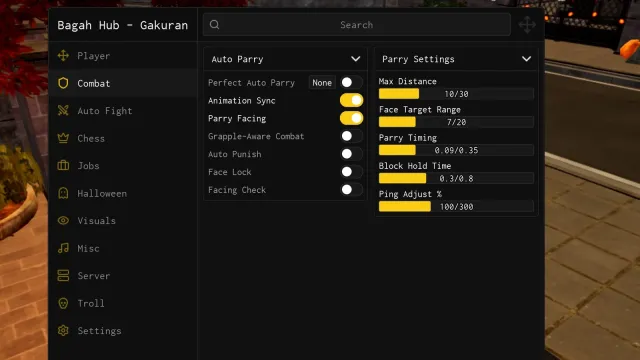
BAGAH HUB - GAKURANVERSION 0.8.0PLAYER- Target Lock - Floating list to lock onto a player. Combat focuses only on the locked target.- Auto Respawn - Respawn automatically when dead .- Ignore Friends - Auto Parry, Auto Fight, and Face Lock skip Roblox friends.- No Dodge Cooldown - Remove the local dodge cooldown so Q can be spammed.- Dodge Cooldown - Set a custom delay between dodges (0 = instant).- No Combat Slowdown - Keep WalkSpeed from dropping while attacking.- Infinite Jump - Jump again in mid-air.- Auto Sprint - Sprint without holding Shift.- WalkSpeed Modifier - Override WalkSpeed while Speed Hack is on.- Enable Speed Hack - Force WalkSpeed to the modifier value.- Fly - WASD flight with adjustable speed.- No Clip - Walk through map collisions.- Anti Fling - Disable collision with other characters so fling exploits cannot launch you.- Teleport to Player - Select and teleport to any player.- Teleport to Location - Select and teleport to saved map locations.COMBAT- Perfect Auto Parry - Automatically parry detected attacks.- Auto Parry Keybind - Toggle Auto Parry with a hotkey.- Animation Sync - Adjust parry timing to the attack animation speed.- Parry Facing - Turn toward the attacker before parrying.- Grapple-Aware Combat - React to grapple attacks.- Auto Punish - Counter after a successful perfect parry.- Face Lock - Continuously face the selected nearby target.- Facing Check - Only react to attackers facing your character.- Parry Settings - Max distance, face target range, parry timing, block hold time, and ping adjust.- Enable Auto Fight - Automatic M1/M2 combat with a target lock range and separate M1/M2 ranges.- Auto Fight Keybind - Toggle Auto Fight with a hotkey.- Mobile Toggle Buttons - On-screen buttons for Auto Parry and Auto Fight.VISUALS- ESP: Box, Health Bar, Name & Info, Highlight / Chams, and adjustable ESP distance.- Player HUD: Draggable health bar and M2 cooldown indicator.MUSIC GAME RHYTHM- Rhythm Auto - Automatically plays Gakuran rhythm notes.- Auto Join Active Song - When another player starts a song (jam), join it automatically with your held rhythm instrument (Guitar/Bass/Drums/Keyboard) so the chart is already synced; no need to open the song wheel manually. Only joins while you are not already playing.- Guitar Chart - For songs with two guitar charts: Follow Performer (mirror the other player), Lead, or Rhythm.- Timing Mode - Always Perfect or Custom Mix.- Custom Mix Ratings - Configure PERFECT, GOOD, and OK chances.- Perfect Offset - Apply a configurable early-input offset in milliseconds.- Hold Extend - Extend long-note holds.- Hold Release - Tune when long notes are released.AUTO PIANO- Online Song Player - Search NanoMidi or load songs from My Songs.- MIDI Conversion and Playback - Convert supported MIDI songs and play them on Gakuran pianos.- 61-Key Piano Support - White and black piano notes.- Chord and Note Timing - Simultaneous chords and repeated notes, played through the game's own piano remote and note samples.- Natural Note Release - Notes fade out like the game's piano (0.55 s tail per note, 0.72 s release on Stop) instead of cutting off instantly.- Resume Playback - Stop keeps the song position; Resume Last Song continues from the next note, while Play starts the selected song from the beginning.- Mobile Piano Controls - Draggable floating controls for loading, browsing, playing, stopping, resuming, and song info.BASKETBALL- Perfect Release - Release a basketball shot at the perfect (green) timing.- Release Lead - Fire early by a configurable number of milliseconds to compensate for ping.SOCCER- Enable Soccer Helper - Master switch, only active on a soccer field.- Auto Aim Kick - Aim kicks at the goal with adjustable power.- Auto Slide Tackle - Slide toward a nearby ball with adjustable range.- Auto Goalkeeper Dive - Dive toward an incoming ball while in goal.- Spam Interval - Delay between slide attempts.JOBS- Enable Auto Job - Automatically apply to the best available shift.- Auto Job Keybind - Toggle Auto Job with a hotkey.- Apply to Best Shift - Pick the highest paying shift on the board.- Select and Apply - Choose a specific shift from the list.- Quit Shift - Leave the current job.- Teleport to Location - Jump to the shift location.- Refresh Job Board - Rescan the available shifts.CHESS- Enable Auto Chess - Plays chess automatically.- Auto Chess Keybind - Toggle Auto Chess with a hotkey.- Max Depth - Search depth for move calculation.- Opening Book - Use known opening moves.- Think Time - Limit per-move calculation time.- Move Delay - Delay between moves.- Promotion Piece - Choose the promotion piece.WHITEBOARD- Free Draw - Draw by following the mouse.- Image URL - Draw an image from a URL.- Ink Threshold - Control which pixels are drawn.- Draw Image and Clear Board.TROLL- Fly Fling - Fling nearby players while flying, with adjustable speed.- Walk Fling - Fling players by walking into them.PERFORMANCE- Anti Lag - Reversibly reduce materials, textures, effects, lights, post-effects, and water visuals.- FPS Display - FPS, ping, memory, and CPU monitor.- Anti AFK - Simulate idle input to prevent auto-kick.SERVER- View Server ID and Place ID.- Copy a server link.- Rejoin the current server.- Server Hop.- Hop to a small server.CONFIGS AND UI- Save, load, overwrite, and delete configurations.- Per-place config autoload.- Menu keybind, UI settings, and theme controls.- Unload Bagah - Disables active features, removes the UI, and removes the FPS display.