DOORS is LSPLASH’s horror experience. This page uses its primary Roblox identity and keeps similarly named roleplay games and copies separate. A DOORS scripts comparison can involve entity information, items, room interaction or interface settings; these categories need different supporting details.
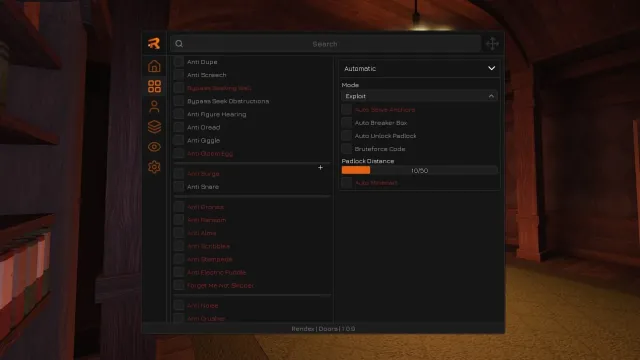
Our first selected comparison focuses on Rendex Hub and Aster. Rendex provides explicit executor exclusions and links an external feature document. Aster describes interface profiles, a pause control, a menu keybind and unloading. Their connected reviews explain what is actually available in the imported description without treating an external feature-count claim as a complete verified list.
Entity features and interface controls
An entity warning or item overlay does not itself establish a successful survival run. A settings profile and a pause button describe menu control, rather than a particular entity response. If a source names an auto-interact or room function, its supported floors and conditions should be checked individually.
Free access and keys
Rendex says that Solara and Xeno are not supported, despite other executor relationships in the source data. Aster’s title mentions a free key and its structured flag marks a key requirement. Free access does not necessarily remove a key step. These conditions remain visible in the individual reviews.
Updates and evidence
The official game description warns that systems may change or break. We checked selected source-file availability without executing the code, validating newer areas or testing entity timing. The imported catalog below includes broad protection and auto-win titles; those are creator claims, not results established by this landing page.
Does free access mean a DOORS hub has no key step?
Not necessarily. The selected Aster source is free but marks a key requirement. Rendex also gives executor exclusions that should be read alongside listed executor links. Neither establishes a tested survival run.
Rendex's DOORS description is most useful for its explicit access and executor conditions. It links an external feature document instead of supplying a detailed feature guide in the imported description.
Aster's DOORS listing describes interface controls more clearly than gameplay behavior. It names profiles and pausing, which should be distinguished from entity detection or survival claims.
Explore Interface. View the script for features and requirements.
Mobile support unspecifiedNo key systemFree
A FEW THINGS TO KNOW
Choosing a DOORS script
Understand the labels before opening an entry.
How do I find a script that fits my game?+
Start with this game’s selected listings, compare the feature descriptions and check key, platform and access requirements. Use the filters to narrow the full catalog.
What is a script key system?+
Some scripts require a separate key from their creator before use. That is different from an executor software license. Check the individual entry for its requirements.
How do I choose a platform?+
Choose your device platform to narrow the listings, then open a script to check its individual executor requirements. Mobile-ready is a separate listing label; not every entry has platform details.
What does the listing update date mean?+
The date refers to the creator’s script listing. Check its feature and access notes for changes. Game updates and listing updates can happen at different times.